


**Note: The content in this article is only for educational purposes and understanding of cybersecurity concepts. It should enable people and organizations to have a better grip on threats and know how to protect themselves against them. Please use this information responsibly.**
Have you ever wondered how threat actors and seasoned penetration testers discover exposed administrative panels, unindexed confidential credentials, and hidden subdomains without even launching an active network scan? The secret lies in leveraging the world’s most powerful, publicly accessible scraping infrastructure: Google’s web crawlers. By utilizing advanced search operators, security professionals can transform a standard search query into an incredibly precise reconnaissance tool. This technique is known as Google Dorking (or Google hacking). It allows you to unearth critical, exposed data that standard search queries completely miss, giving you the upper hand in both offensive reconnaissance and defensive auditing.
Why It Is Needed: The Role of Google Dorks in Cybersecurity
Before exploring the technical mechanics of advanced search strings, it is crucial to understand why Google Dorking is an indispensable skill in modern information security.
In cybersecurity, gathering information is the first and most critical stage of any security assessment. Reconnaissance is generally split into two categories: active and passive. Active reconnaissance involves directly interacting with the target system (e.g., port scanning with Nmap, running vulnerability scanners), which can trigger security alerts, firewalls, and Intrusion Detection Systems (IDS).
Google Dorking, by contrast, is a form of passive reconnaissance. Because you are querying Google’s cached database rather than hitting the target company’s servers directly, the target organization has absolutely no technical way of knowing they are being investigated. No logs are generated on their firewalls, and no alerts are tripped. You are simply asking Google to show you what its automated bots have already found and indexed.
Key Use Cases for Defenders and Attackers
- Identifying Data Leakage: Organizations frequently misconfigure cloud storage buckets, file servers, or backup directories, accidentally exposing them to the open web. Google Dorking catches these leaks before malicious actors do.
- Exposed Administrative Interfaces: Attackers hunt for exposed administrative portals to launch brute-force attacks or exploit known software vulnerabilities. Finding these interfaces allows defenders to restrict or isolate them safely.
- Open-Source Intelligence (OSINT): Security researchers use dorks to gather intelligence on an organization’s infrastructure, software versions, and employees without ever sending a single packet to the target network.
- Targeted Threat Hunting: Analysts can hunt for specific compromised assets, malware command-and-control (C2) frameworks, or unpatched third-party applications indexed across the web.
The Legal and Ethical Landscape
It is highly critical to understand that all information retrieved via Google Dorking is entirely public and legal to access. You are querying an index provided openly by a commercial search engine.
However, the line between ethical research and malicious activity depends entirely on intent and actions:
While searching for public information is legal, using the discovered data to exploit a system, brute-force a portal, or download proprietary, restricted documents without explicit authorization transitions into illegal hacking. Furthermore, Google monitors automated or high-velocity dorking queries closely. Frequent execution of advanced operators will trigger CAPTCHAs or temporary IP blocks. Always practice dorking responsibly to audit your own footprints or within authorized bug bounty scopes.
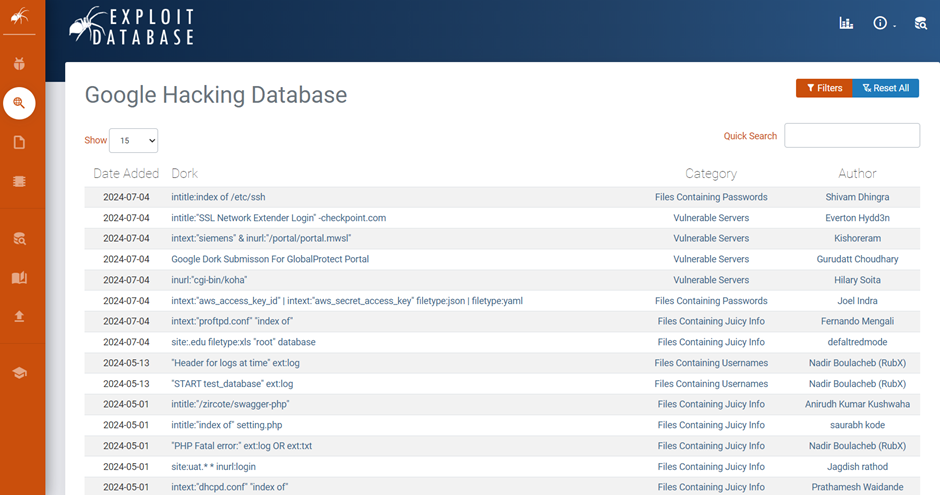
To centralize knowledge of these search queries, the cybersecurity community relies on the Google Hacking Database (GHDB), a community-driven repository maintained by Exploit Database (Exploit-DB). The GHDB lists thousands of valid, practical Google dorking commands categorized by the type of exposure they uncover, such as files containing passwords, vulnerable servers, or sensitive directories.
How to Do It: Structural Framework and Technical Execution
To master Google Dorking, you must understand how Google interprets its search index. Google’s automated crawlers, known as spiders or Googlebots, navigate the internet by following hyperlinks from site to site. By default, these bots index almost all publicly accessible text, media, metadata, and structural code they encounter.
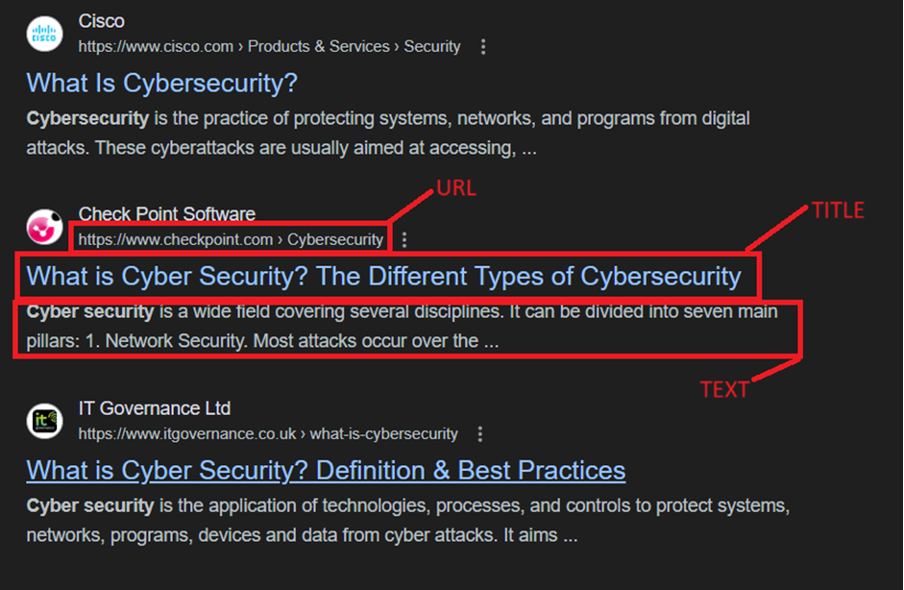
Every web document indexed by Google is broken down into specific structural components:
- URL (Uniform Resource Locator): The global web address used to locate a specific resource on the internet (e.g., https://example.com/admin/login.php).
- Text (Body Content): The actual visible text, paragraphs, and data contained within the body of the webpage.
- Title: The specific webpage heading or name defined in the HTML <title> tag, which appears within the browser’s tab and as the main clickable link in Google search results.
The Anatomy of a Dork
A Google Dork follows a highly strict syntax structure:
operator:keyword
There must be no spaces between the colon (:) and your target keyword or search string. For example, “site:example.com” is valid, whereas “site: example.com” will fail, causing Google to treat the operator as a standard text term.
Deep Dive: The 3 Core Cybersecurity Use Cases
Use Case A: Retrieving Sensitive Files from Specific Domains
Organizations often inadvertently host internal documents, policy papers, or backup files on public-facing web servers. By leveraging the filetype: operator, you can force Google to filter out all HTML webpages and only display specific file extensions.
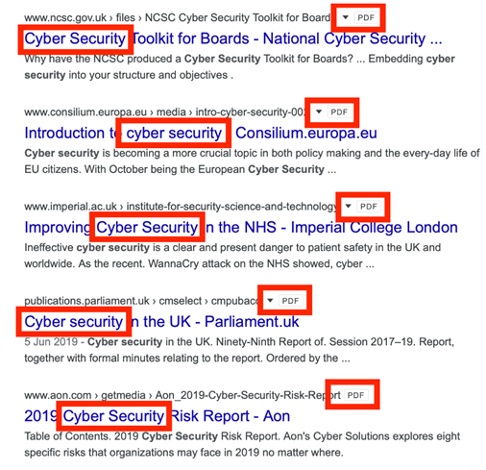
- Dork Structure: “Cyber security filetype:pdf”
When this query is executed, Google eliminates standard websites and returns only standalone PDF documents that contain the phrase “cyber security”.
From an offensive or defensive assessment standpoint, an auditor will narrow this scope to a specific target domain using the syntax: site:targetcompany.com filetype:pdf.
Reviewing these files yields massive advantages:
- Metadata Inspection: By downloading these documents and running them through metadata extraction tools (like ExifTool), an analyst can extract internal author usernames, local software versions, operating systems, creation dates, and network printer paths.
- Custom Wordlist Generation: The terminology, internal project names, and employee details found within these public documents can be harvested to build highly targeted, custom wordlists for password spraying or social engineering simulations.
Use Case B: Subdomain Enumeration for Attack Surface Mapping
Mapping an organization’s subdomains is an essential step in asset discovery. Companies often secure their primary domain (e.g., www.company.com) but neglect peripheral subdomains used for development, staging, testing, or internal tooling.
- Dork Structure: site:facebook.com -site:www.facebook.com
This query instructs Google’s engine to list every single indexed page belonging to facebook.com, while explicitly subtracting (-) any results that originate from the primary www host.
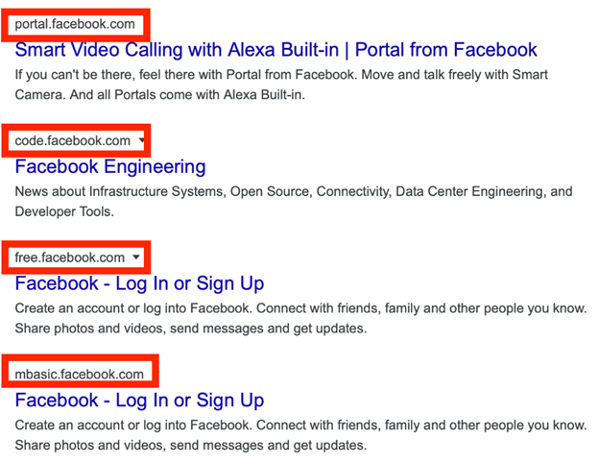
The resulting output strips away the main site, immediately exposing alternative hosts like portal.facebook.com, code.facebook.com, or staging environments. For an ethical hacker, discovering these unadvertised portals reveals valuable entry points, such as legacy applications or employee login dashboards that lack modern authentication controls.
Use Case C: Targeted Keyword Searching for Exposed Portals
Finding specific interfaces, such as administration panels or configuration consoles, is significantly faster when targeting the URL structure directly. The inurl: operator forces Google to search for precise strings embedded inside the website’s address bar.
- Dork Structure: facebook.com inurl:admin
This string instructs Google to look at pages associated with Facebook that contain the word “admin” anywhere inside the URL string.
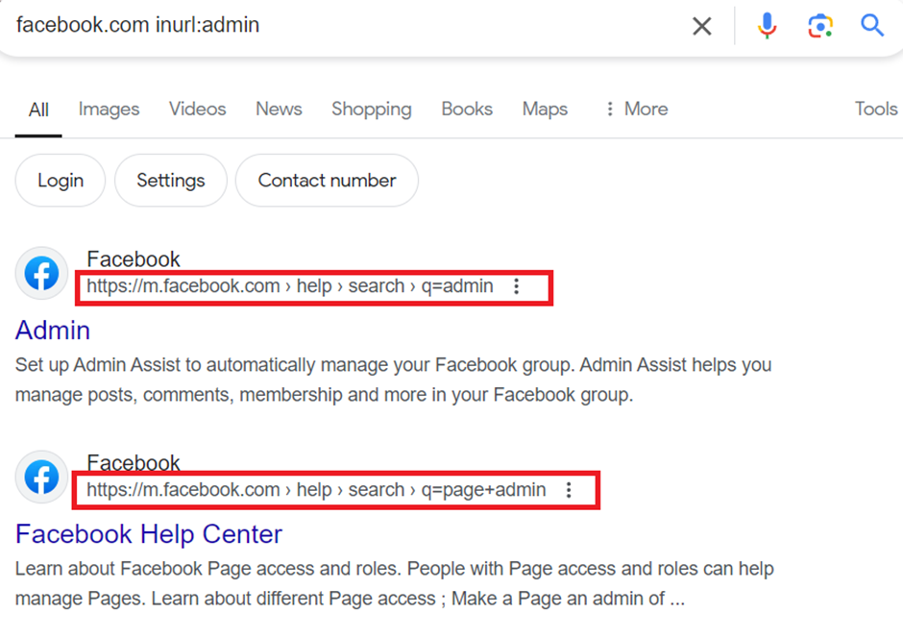
If an auditor expands this logic to target broad classes of web technologies, they can locate misconfigured portals across the internet. For example, searching inurl:login.php or inurl:admin/login yields administrative entry points.
If these portals are within an authorized assessment scope, an attacker might attempt credential stuffing, brute-forcing, or bypassing the login prompt altogether via SQL Injection (SQLi). For a defender, finding these exposed links means they can quickly implement access control lists (ACLs) to hide them from the public eye.
Comprehensive Reference: Advanced Search Filters
Beyond the primary use cases outlined above, Google supports a wide array of specialized filters. Understanding how to mix, match, and combine these operators allows you to build highly targeted search strings.
| Filter Name | Functional Description | Technical Example | Expected Search Output |
| allintext | Restricts results to pages where all specified keywords appear strictly within the visible body text. | allintext:”root password dump” | Webpages containing the exact words “root”, “password”, and “dump” in their body text. |
| intext | Searches for the specified keyword within the text body, but allows subsequent terms to appear anywhere on the page (URL, title, etc.). | intext:”index of /” | Pages containing the directory listing string “index of /” within the text body. |
| allinurl | Restricts results to pages where all specified keywords appear within the website’s URL string. | allinurl:”wp-content/uploads” | Websites exposing their WordPress uploads directory in the URL. |
| intitle | Searches for the occurrence of the keyword explicitly within the page’s HTML <title> tag. | intitle:”Dashboard [Jenkins]” | Exposed instances of the Jenkins continuous integration automation server. |
| link | Searches for external, third-party webpages that contain active hyperlinks pointing to the specified target URL. | link:www.microsoft.com | Websites that actively link back to Microsoft’s main domain. |
| related | Discovers and enumerates websites that Google classifies as structurally or contextually “similar” to the specified domain. | related:www.google.com | A list of alternative search engines or web directories (e.g., Bing, Yahoo). |
Defensive Strategies: Neutralizing the Threat of Google Dorking
Knowing how to execute Google Dorks is only half the battle. As an administrator, security engineer, or system architect, your primary responsibility is ensuring your organization’s sensitive infrastructure stays invisible to public search crawlers.
There are three primary layers of defense you can implement to neutralize information exposure via Google hacking:
1. Network Access Controls: Geofencing and IP Whitelisting
Restricting network accessibility at the firewall or web application level ensures that even if Google indexes a link, unauthorized users cannot open it.
- Geofencing: This technique blocks inbound network traffic based on the geographic origin of the IP address. For instance, a local corporate network might block all traffic originating from outside its home country.
- The Security Flaw: Geofencing offers weak protection against dedicated threat actors. An attacker can easily configure a Virtual Private Network (VPN) or rent a proxy server located inside the whitelisted country, instantly bypassing the geographic block.
- IP Whitelisting: A far more secure approach, IP whitelisting explicitly permits defined IP addresses or CIDR blocks (such as a company’s corporate headquarters or VPN gateway) to access a resource, while dropping all other connection attempts by default. This is ideal for development environments, staging servers, and internal tools. If a Google crawler cannot access the site due to an IP block, it cannot index the content.
2. Crawler Restrictions: Implementing a Robust robots.txt File
The most direct way to control what search engines index is by managing a robots.txt file. This plaintext file sits at the root directory of your web server (e.g., https://example.com/robots.txt) and serves as a directive guide for automated crawlers.
To completely prevent search engines from crawling and indexing sensitive directories on your server, you must explicitly declare restriction rules:
Code Syntax Breakdown
- User-agent: * targets all search engine crawlers (Googlebot, Bingbot, DuckDuckBot).
- Disallow: The forward slash (/) represents the root directory of the website. By pairing it with Disallow, it explicitly tells the bots: “You are forbidden from crawling or indexing any part of this entire website.”
Crucial Defensive Catch-22: While a robots.txt file successfully restricts compliant search engines like Google, it is a public file. Malicious threat actors will intentionally read your robots.txt file to find the exact directories you are trying to hide. Therefore, never rely on robots.txt to secure data. Always back it up with strong authentication (e.g., multi-factor authentication) and IP-based access controls.
3. Incident Response: Requesting Urgent Content Removal
If you run an audit against your organization and discover exposed database backups, configuration files, or sensitive portals actively indexed in search results, you must take immediate remediation steps:
- Fix the Root Cause: First, take the exposed resource offline, apply authentication, or update your network access controls so the file is no longer accessible to the public.
- Submit a Google Removal Request: Simply removing the file from your server does not instantly clear it from Google’s active search cache. To expedite this process, an authorized site owner can log into Google Search Console and submit an urgent request to temporarily or permanently remove the URL from search results.
Google requires validation that you own or manage the domain before processing the removal. Once approved, the indexed link and cached snapshot are purged, preventing threat actors from finding the asset via passive dorking queries.
Conclusion
Google Dorking highlights how easily public web scraping can be used for advanced information gathering. While these search operators give attackers a stealthy way to conduct passive reconnaissance without triggering security alerts, they also serve as a vital diagnostic tool for defenders.
By proactively auditing your own public digital footprint using operators like site:, filetype:, and inurl:, you can find and fix data leaks before they are exploited. Combining these regular audits with strong defensive controls, such as strict IP whitelisting, proper robots.txt management, and rapid content removal procedures, ensures your organization’s sensitive data stays secure and out of public search results.
Caught feelings for cybersecurity? It’s okay, it happens. Follow us on LinkedIn and Instagram to keep the spark alive.