

How MCP is revolutionizing communication between AI models — and why every developer needs to understand it now.
What is Model Context Protocol (MCP)?
If you’ve spent time building AI-powered applications, you’ve likely hit a frustrating wall: getting one AI model to meaningfully communicate with another, or with your data, tools, and APIs is surprisingly hard. Model Context Protocol (MCP) is the open standard designed to solve exactly that problem.
Introduced by Anthropic in late 2024, MCP is an open protocol that standardizes how AI models, especially large language models (LLMs), connect to external data sources, tools, and services. Think of it as a universal adapter for the AI ecosystem. Just as USB-C standardized how your devices charge and transfer data, MCP standardizes how AI models access context.
One-sentence definition: MCP is an open protocol that enables AI assistants to securely connect to local and remote data sources, tools, and systems in a standardized, composable way.
Before MCP, every integration between an AI model and an external tool required bespoke, hand-rolled code. Want your chatbot to read from your database? You’d write a custom integration. Want it to call a GitHub API? Another custom integration. MCP eliminates this fragmentation by providing a single, consistent protocol that works across tools, models, and platforms.
Why MCP Matters in Modern AI Systems
The modern AI stack is increasingly multi-model and multi-tool. Applications rarely rely on a single model in isolation. Instead, they orchestrate dozens of components: retrieval systems, code interpreters, search engines, databases, and more. Without a shared protocol, this creates a compounding integration problem.
Interoperability
Write one integration, use it with any MCP-compatible model — Claude, GPT, Gemini, and open-source alternatives.
Security by Design
MCP enforces strict access controls and sandboxing, so AI models only access what they’re explicitly granted permission to.
Performance
Optimized context delivery means models receive exactly what they need — no more, no less — reducing latency and cost.
Composability
MCP servers are modular building blocks. Stack, combine, and swap them to build powerful AI pipelines.
Perhaps most importantly, MCP shifts the development paradigm from integration-by-exceptionto integration-by-convention. Developers no longer need to read bespoke API docs for every tool they want to connect — they follow the MCP specification once, and it applies everywhere.
Key Concepts of Model Context Protocol
To effectively use MCP, you need to understand its core building blocks:
MCP Hosts
The host is the application that runs the AI model and coordinates MCP communication. Examples include Claude Desktop, VS Code extensions, or custom AI apps you build. Hosts manage the lifecycle of connections and enforce security policies.
MCP Clients
A client lives inside the host and maintains one-to-one connections with MCP servers. The client handles the low-level protocol communication, translating between the host’s needs and the server’s capabilities.
MCP Servers
Servers are lightweight programs that expose capabilities through the MCP protocol. A server might expose your file system, a database, a REST API, or a specialized tool like a code linter. Servers declare what resources and tools they offer.
The Three Primitives
MCP servers can expose three types of capabilities:
| PRIMITIVE | WHAT IT IS | EXAMPLE |
|---|---|---|
| Resources | Structured data the model can read | Files, database records, API responses |
| Tools | Functions the model can call | Run a shell command, send an email, query a DB |
| Prompts | Pre-built templates the model can invoke | Summarize a doc, generate a PR description |
Transport Layer
MCP communicates via JSON-RPC 2.0 over two transport methods: stdio (standard input/output for local processes) and HTTP with Server-Sent Events (for remote servers). This makes MCP flexible enough for both local development tools and cloud-hosted services.
How MCP Works: Architecture Deep Dive
Understanding MCP’s communication flow is essential for building reliable integrations. Here’s what happens from the moment a user sends a message to when the AI responds with context from an external tool:
Initialization & Capability Negotiation
When a host starts, MCP clients connect to configured servers and perform a handshake. The server declares its capabilities (which resources, tools, and prompts it offers) and the client registers these with the host.
Context Request
When the AI model needs information to answer a query, the host identifies which MCP server can provide it and issues a structured request via the client — e.g., “read file at path /project/README.md”.
Server Processing
The MCP server receives the request, validates permissions, fetches or computes the result, and returns structured data following the MCP schema.
Context Injection
The host injects the returned context into the model’s prompt window in a standardized format. The model uses this grounded information to generate an accurate, informed response.
Tool Execution (if applicable)
If the model decides to call a Tool (e.g., “run this SQL query”), the host routes the tool call back through the client to the server, executes it, and returns the result to the model.
Implementing MCP: Step-by-Step Guide
Let’s walk through building a complete MCP server from scratch. We’ll create one that exposes a simple database tool — the kind you’d use in a real production AI assistant.
Prerequisites
- Node.js 18+ (or Python 3.10+)
- Basic understanding of JSON-RPC
- An MCP-compatible host (Claude Desktop, or a custom host using the MCP SDK)
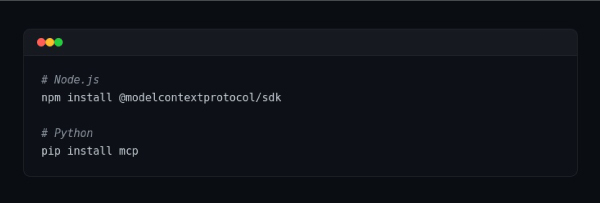
Step 1: Install the MCP SDK
Terminal
Step 2: Create Your MCP Server
Here’s a minimal but production-ready MCP server in TypeScript that exposes a database query tool:
database-server.ts
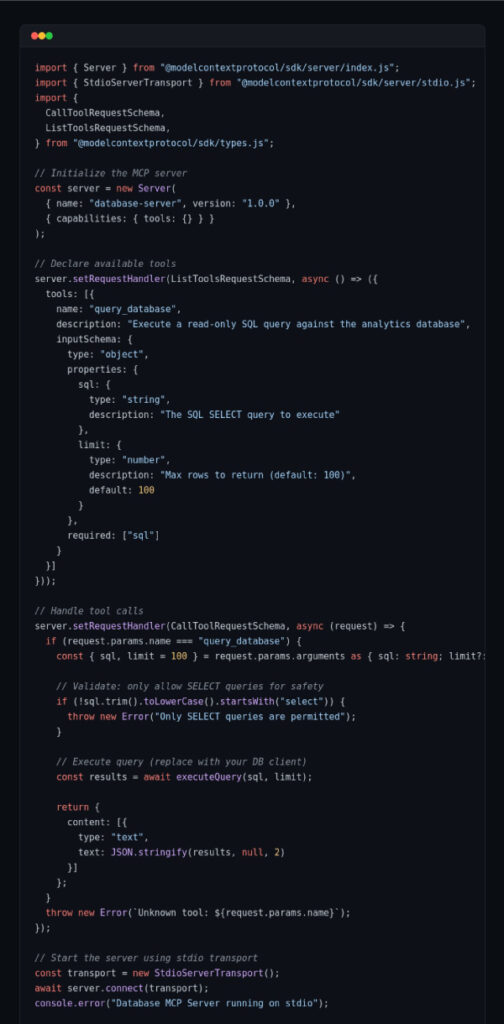
Security note: Always validate and sanitize inputs in your MCP server. In the example above, we enforce SELECT-only queries to prevent destructive operations. Apply the principle of least privilege — expose only what the AI model absolutely needs.
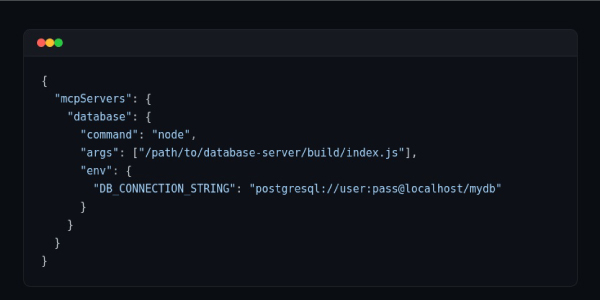
Step 3: Connect to Claude Desktop
Add your server to Claude Desktop’s configuration file:
claude_desktop_config.json
Python Alternative
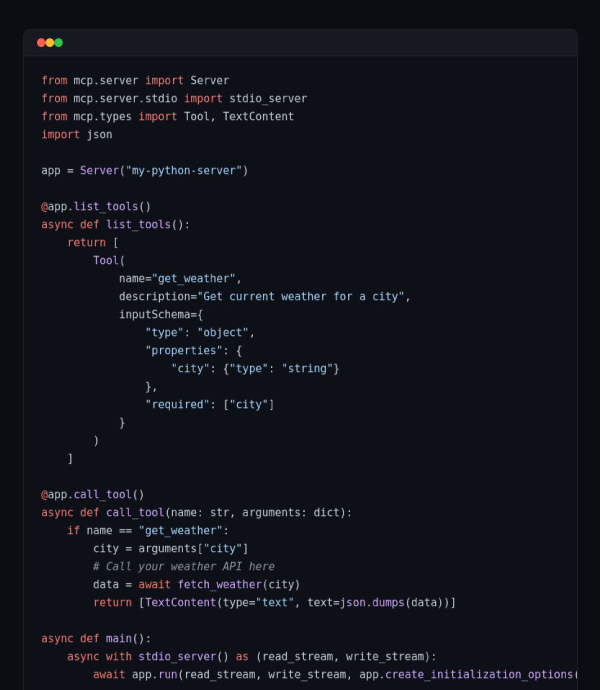
Prefer Python? The MCP SDK has first-class Python support:
server.py
Real-World Use Cases
MCP isn’t just theoretical. Here are concrete applications where it delivers immediate value:
Software Development Assistants
IDE plugins like the official Claude for VS Code extension use MCP to give the AI model access to your entire codebase, running terminal, git history, and test results. Instead of copy-pasting code snippets, the model understands your full project structure and can make contextual suggestions.
Business Intelligence Copilots
Connect your data warehouse via an MCP server to create a natural-language analytics tool. Employees can ask questions like “What were our top 5 products by revenue last quarter?” and the AI queries the database directly, returning accurate figures — not hallucinated ones.
Agentic Workflow Automation
Multi-step automation agents that book meetings, send emails, update CRMs, and manage project tasks can use a constellation of MCP servers — one for each tool — orchestrated by a single AI agent. The standardized protocol makes adding new tool capabilities as simple as deploying a new server.
Document Intelligence
Law firms, research teams, and healthcare providers use MCP to give AI models access to private document repositories, enabling semantic search and synthesis across thousands of files — without exposing sensitive data to third-party LLM providers unnecessarily.
MCP for Performance Optimization
A naive AI integration fetches everything upfront, dumping mountains of context into the model’s prompt window. This is expensive, slow, and often counterproductive — the model gets confused by irrelevant information. MCP enables a smarter approach:
Lazy Context Loading
Resources are fetched on-demand when the model requests them, not preloaded. This dramatically reduces token usage and API costs.
Server-Side Caching
MCP servers can cache expensive resource lookups. The database query result is cached; subsequent requests return instantly.
Parallel Tool Calls
Hosts can issue multiple MCP requests concurrently, letting several tools respond in parallel rather than sequentially.
Structured Data Over Raw Text
MCP returns typed, structured responses. The model receives exactly the fields it needs, not a full HTML page to parse.
Performance benchmark: In production deployments, teams have reported up to 60% reductions in average token usage after switching from naive context injection to MCP-based lazy loading — translating directly to reduced latency and LLM API cost savings.
Best Practices for Implementing MCP
Design for the Principle of Least Privilege
Your MCP server should expose the minimum set of capabilities needed for the use case. A customer-support AI doesn’t need write access to your entire database — give it read access to the orders table only.
Validate All Tool Inputs
Never trust inputs coming from an AI model. LLMs can be manipulated into calling tools with unexpected arguments. Always validate and sanitize inputs server-side, independent of the model’s behavior.
Keep Servers Focused and Single-Purpose
Resist the temptation to build a monolithic MCP server. Small, focused servers (one for files, one for the database, one for the calendar) are easier to maintain, test, and audit.
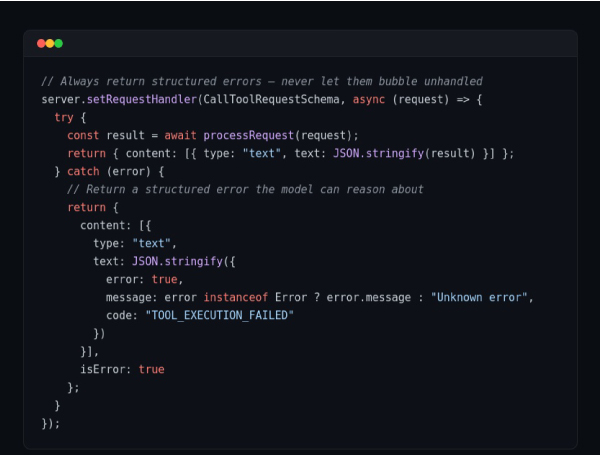
Implement Comprehensive Error Handling
error-handling.ts
Add Observability from Day One
Log every tool call with its arguments, execution time, and result. This audit trail is invaluable for debugging, cost analysis, and understanding how AI models actually use your tools.
Version Your Servers
Use semantic versioning for your MCP servers. Hosts negotiate capabilities during initialization, so backward-compatible changes are safe — but breaking changes require coordinated host updates.
Frequently Asked Questions
Is MCP only for Anthropic’s Claude?
No. MCP is an open protocol and is model-agnostic. While Anthropic created and maintains it, any LLM provider or application can implement MCP support. Several third-party tools and editors have already adopted it.
How is MCP different from function calling / tool use?
Function calling is a model-level capability — it’s how an LLM signals that it wants to invoke a tool. MCP is the full-stack protocol that standardizes how tools are discovered, connected, invoked, and how results are returned. MCP uses function calling as one mechanism, but adds standardized discovery, transport, security, and resource access on top.
How do I implement MCP in AI systems for performance optimization?
Focus on lazy loading (fetch context on demand), structured responses (return only needed fields), server-side caching for expensive operations, and parallel tool call execution. Profile your token usage before and after — the results are typically dramatic.
Can I use MCP with remote servers over the internet?
Yes. MCP supports HTTP transport with Server-Sent Events (SSE) for remote servers. You can deploy your MCP server to any cloud provider and connect to it securely. Always use HTTPS and implement proper authentication for remote servers.
What’s the performance overhead of MCP?
For local (stdio) servers, overhead is negligible — sub-millisecond per call. For remote HTTP servers, the typical round-trip overhead is 5–50ms depending on network conditions, which is far smaller than the LLM inference latency.
The Future of MCP in AI Development
MCP is young but already shows signs of becoming a foundational layer in AI infrastructure. Several developments are shaping its trajectory:
Multi-Agent Orchestration
MCP is expanding to support agent-to-agent communication, not just model-to-tool. In this model, specialized AI agents (one for research, one for code generation, one for verification) collaborate via MCP, with each acting as both a client and server depending on the task.
Emerging Ecosystem
A growing catalog of open-source MCP servers covers everything from GitHub, Slack, and Google Drive to Postgres, Puppeteer, and Stripe. As the ecosystem matures, developers will spend less time building integrations and more time building actual product value.
Standardization Across the Industry
Major AI development platforms are evaluating MCP adoption. If the protocol achieves the kind of cross-industry adoption that REST achieved for web APIs, it will fundamentally change how AI applications are architected — creating a shared marketplace of tools that any model can use.
The bottom line: Model Context Protocol isn’t just a useful tool — it’s a paradigm shift. Developers who build MCP fluency now will have a significant advantage as multi-model, tool-augmented AI applications become the industry standard. Start with a simple server, learn the protocol, and build from there.
Caught feelings for cybersecurity? It’s okay, it happens. Follow us on LinkedIn and Instagram to keep the spark alive.